Availability Sync Automation for Multi-Property Managers
Streamline bookings with availability sync automation for multi-property managers, ensuring real-time updates and eliminating double bookings.

Availability Sync Automation for Multi-Property Managers
Availability sync automation is the automated, two-way exchange of calendar data between booking platforms and your property management system, so a reservation on one channel instantly blocks that date everywhere else. For any portfolio beyond a handful of units, the right approach is real-time, bidirectional API sync, run through a channel manager or a PMS with certified API integrations. That architecture updates every connected calendar in seconds instead of hours.
- Use API sync when you manage multiple properties across three or more channels.
- iCal is acceptable only for single-property hosts or very low-volume setups where a few hours of lag is a tolerable risk.
- Never rely on iCal as your only line of defense once you’re taking bookings across Airbnb, Vrbo, and a direct site simultaneously.
Key Takeaways
Availability sync automation works best when real-time, bidirectional API connections replace polling-based iCal feeds across every channel you distribute through.
| Point | Details |
|---|---|
| Choose API over iCal | iCal only syncs availability on a delay of hours; API sync updates every field in seconds. |
| Set authoritative fields | Define which system owns availability, rates, and content before connecting anything. |
| Test before full rollout | Run a sample property through booking, cancellation, and edit dry-runs first. |
| Monitor continuously | Alert on webhook failures and audit field mappings every quarter to catch drift early. |
| RealtevoOS as your sync engine | RealtevoOS centralizes Airbnb and Vrbo data with automated blocking and owner updates in one dashboard. |
Table of Contents
- Why Real-Time Two-Way Sync Matters for Property Managers
- How Do iCal, API, and Channel Manager Sync Differ?
- Implementation Checklist: Setting Up Availability Sync
- Monitoring, Verification, and Troubleshooting Sync Health
- Why RealtevoOS Is a Practical Option for Sync Automation
- How Sync Automation Changes Guest Experience and Booking Rates
- What Security and Privacy Steps Matter When Syncing Availability Data
- What to Consider When Integrating Multiple OTAs
- Where Is Availability Sync Automation Headed Next?
- What Actually Matters When You Automate Sync
- See How RealtevoOS Handles Availability Sync for You
- Frequently Asked Questions
- Sources
Why Real-Time Two-Way Sync Matters for Property Managers
Sync lag is the mechanism behind almost every double booking. Two guests book overlapping dates on different platforms during the gap between calendar refreshes, and neither channel knows about the other’s reservation until the next poll. That gap isn’t hypothetical: iCal feeds commonly poll every one to twelve-plus hours, and a lot can happen to a calendar in twelve hours during a holiday weekend.
The fallout compounds fast. Beyond the guest confrontation, double bookings tend to trigger platform penalties, lower search ranking, and one more bad review sitting on your profile permanently. Property managers who automate the sync layer report the opposite effect: fewer manual calendar edits, faster onboarding of new units, and hours reclaimed each week that get reinvested into growing the portfolio instead of babysitting spreadsheets.
How Do iCal, API, and Channel Manager Sync Differ?
Each method solves a different part of the availability problem, and confusing them is where most managers get burned.
iCal sync works by having platforms poll a shared calendar link on a fixed schedule. Airbnb’s iCal feed refreshes roughly every three hours; Vrbo’s closer to six. It’s free, fast to set up, and syncs availability only. It carries no rate data, no minimum-stay rules, no booking details. That makes it a reasonable stopgap for a single listing but a liability once volume climbs.
API sync is event-driven rather than scheduled. The instant a reservation is confirmed, canceled, or modified, that event fires a webhook and every connected system updates within seconds. Bidirectional API sync keeps availability, rates, and bookings consistent across platforms in near real time, which is the entire reason it’s the standard for anyone running more than one or two units.
Channel managers sit on top of API connections as a distribution layer. Rather than you maintaining a separate certified API link to every OTA, the channel manager holds those connections centrally and pushes updates outward. A channel manager with certified API connections can broadcast an availability change across every linked platform in seconds, and most connect to a wide range of PMS platforms so you’re not forced to abandon your existing operational software.
PMS-led sync works when your property management system itself holds certified API connections to your major channels. That setup can serve as your single source of truth. Once you’re distributing across five, six, or more OTAs, though, a dedicated channel manager usually becomes the more resilient piece of the stack, since distribution breadth is its core job while your PMS focuses on operations and owner accounting.
Implementation Checklist: Setting Up Availability Sync
Rolling out sync automation without a plan is how managers end up with silent double bookings three weeks later. Work through this sequence property by property, not portfolio-wide on day one.
- Inventory your channels and volume. List every OTA, direct booking site, and PMS touchpoint per property, and flag which ones currently rely on iCal.
- Define your authoritative source per field. Decide up front which system owns availability, which owns rates, and which owns content, so simultaneous edits don’t fight each other.
- Map fields and enable webhooks. Confirm date, price, and booking-status fields align across systems, and prioritize event-driven integrations over polling wherever a certified API exists.
- Test with one sample property. Run through a full cycle: create a booking, cancel it, edit the dates, and confirm every connected calendar reflects the change within the expected window.
- Run deliberate dry runs. Force edge cases, like a same-day cancellation and rebooking, to see whether the sync loop handles it cleanly or creates a conflict.
- Roll out in phases. Move a small batch of properties live, watch for a week, then expand. Keep a rollback plan ready in case a channel’s API behaves differently than documented.
- Document precedence rules and audit quarterly. Auditing field mappings every quarter catches drift before it becomes a guest-facing problem.
Pro Tip: Pick your lowest-volume property for the initial sample test, not your top performer. A sync error on a unit with two bookings a month is a minor cleanup; the same error on your best-selling listing during peak season is a guest relations crisis.
Monitoring, Verification, and Troubleshooting Sync Health
Sync automation isn’t a “set it and forget it” project. Build alerting for webhook failures, expired API tokens, and any iCal feed that stops updating on schedule, because a silent failure is more dangerous than an obvious one. The most common failure modes are expired authentication tokens, mismatched field mappings after a platform updates its API, and sync loops where two systems keep overwriting each other’s updates.
If you suspect a double booking, don’t guess. Pull the reservation timestamps from both platforms, check your reconciliation log for the exact moment each booking hit the system, and confirm which one arrived first under your precedence rules.
- Set alerts for any integration that goes silent for more than a few hours.
- Review reconciliation reports weekly, not just when a guest complains.
- Schedule a full mapping audit every quarter to catch configuration drift early.
Polling gaps of three to six hours on major platforms are exactly where double bookings tend to originate, which is why real-time monitoring on your API connections matters as much as the initial integration itself.
Why RealtevoOS Is a Practical Option for Sync Automation
RealtevoOS was built around the exact problem this checklist solves: keeping availability, pricing, and guest data consistent across a growing portfolio without a human checking calendars by hand. The platform pulls real-time data from Airbnb and Vrbo into a single dashboard, so a booking on one channel is reflected everywhere else without waiting on a manual refresh.
- Automated calendar blocking the moment a reservation is confirmed, canceled, or modified.
- Guest onboarding messages and owner updates triggered automatically off the same sync events.
- AI-assisted workflows that flag anomalies, like a listing that stops updating, before they turn into a guest complaint.
- Built to scale with your portfolio, so adding units doesn’t mean adding headcount.
Property managers using automated workflows like these report saving several hours a week that used to go into manual calendar edits and status updates.
Consolidating availability, messaging, and reporting into one operational layer is what turns sync automation from a technical fix into a genuine time-saver for a growing management company.
How Sync Automation Changes Guest Experience and Booking Rates
Guests notice sync failures before you do, usually in the worst possible way: a confirmed booking that turns into an apology email. A double booking doesn’t just cost you one guest, it costs you the review that guest leaves, and that review sits on your listing for every future searcher to see.
Real-time availability has the opposite effect on the booking funnel. When your calendar reflects true availability the instant a date opens up, from a same-day cancellation, for instance, that inventory becomes bookable again immediately instead of sitting dark for hours. On high-demand weekends, that window is exactly when last-minute searchers are browsing, and a calendar that lags behind reality simply loses that revenue to a competing listing that updated faster.
There’s a trust dimension too. Guests booking through Airbnb or Vrbo increasingly check multiple platforms before committing, and inconsistent pricing or availability across those platforms signals a poorly run operation. A calendar that stays accurate everywhere, all the time, reads as professionalism, and professionalism converts. Search-rank algorithms on major OTAs also factor in reliability signals like cancellation rates, so fewer sync-driven cancellations tends to translate into better placement over time. The connection between operational tidiness and booking volume isn’t abstract. It shows up directly in occupancy numbers once the manual gaps get closed.
What Security and Privacy Steps Matter When Syncing Availability Data
Availability sync automation moves more than just open and blocked dates between systems. Depending on the integration, it can carry guest names, contact details, payment references, and reservation metadata across multiple third-party platforms, which means your security posture matters as much as your sync speed.
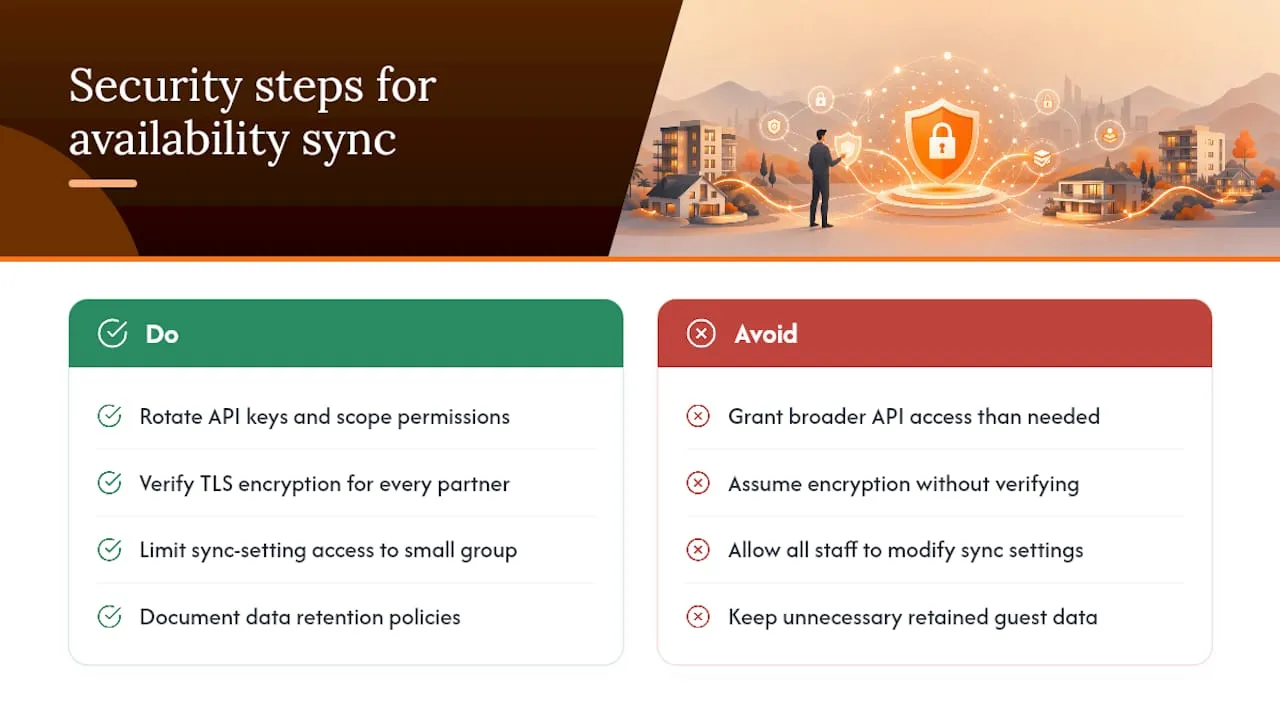
Start with API credential hygiene. Every certified integration issues an API key or OAuth token, and that credential should be rotated periodically and scoped to only the permissions it actually needs. A channel manager or PMS that requests broader access than the sync task requires is a red flag worth questioning before you connect it.
Encrypt data in transit, and confirm any platform you connect to does the same on their end. Most reputable channel managers and PMS vendors support TLS encryption by default, but it’s worth verifying rather than assuming, especially with smaller or newer integration partners.
Access control matters just as much internally. Not every staff member needs the ability to modify sync settings or authoritative field rules. Limiting that access to a small group reduces the odds of an accidental misconfiguration cascading across your entire portfolio.
Finally, know what data your integrations retain and for how long. Guest information flowing between an OTA, a channel manager, and your PMS should follow a documented retention policy, both for compliance reasons and because unnecessary data sitting in an unused integration is simply unnecessary risk.
What to Consider When Integrating Multiple OTAs
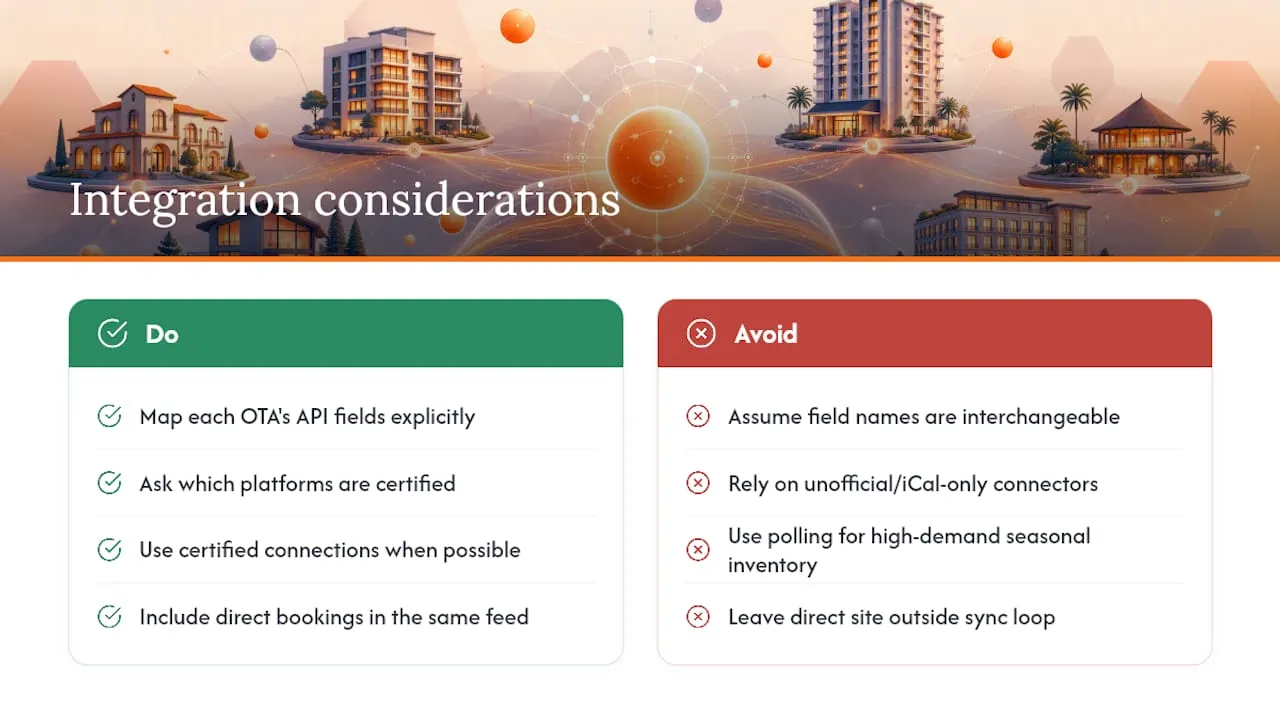
Every OTA structures its API a little differently, and that inconsistency is the root of most integration headaches. Airbnb, Vrbo, and Booking.com each define availability, minimum-stay rules, and cancellation policies with their own field names and update cadences, so a mapping that works cleanly for one platform can misfire on another if you assume they’re interchangeable.
Certification matters more than most managers realize. OTAs that certify a channel manager’s API connection have verified that integration meets their data-handling and update-speed requirements, which is a meaningfully stronger guarantee than a generic or unofficial connector. When you’re evaluating a channel manager or PMS, ask directly which of your target platforms carry certified connections versus which ones are supported only through iCal fallback.
Volume and seasonality also shape which integration approach makes sense. A property doing steady year-round bookings across three channels has a very different risk profile than a seasonal coastal rental fielding a surge of simultaneous inquiries every summer weekend. The second scenario is exactly where polling-based methods fail most visibly, because demand concentrates into narrow windows where every hour of lag counts.
Direct bookings deserve the same rigor. A direct booking website sitting outside your channel manager’s sync loop is a blind spot. If your direct site isn’t wired into the same availability feed as your OTA connections, it can accept a reservation for a date that’s already gone, undermining the entire point of automating the rest of your stack.
Where Is Availability Sync Automation Headed Next?
Machine learning is starting to move sync automation from reactive to predictive. Instead of simply reflecting bookings as they happen, some platforms are beginning to flag anomalies, like a listing whose sync events suddenly stop matching expected patterns, before a manager even notices something’s wrong.
Expect deeper AI involvement in field mapping itself. Manually defining precedence rules for every field across every integration is tedious work, and the next generation of tools will likely automate much of that initial configuration by learning from how similar properties are typically set up.
Dynamic pricing and availability are also converging faster than they used to. Rather than treating rate updates and calendar updates as separate sync events, unified platforms are starting to push both simultaneously, so a price change tied to a demand spike lands everywhere at the same moment the calendar reflects the new availability window.
The bigger shift is toward consolidation. Managers are increasingly expecting one dashboard that handles distribution, guest messaging, and owner reporting off the same underlying sync engine, rather than stitching together separate tools that each solve one slice of the problem. That consolidation is where the category is clearly heading, and it’s the model built around AI-driven automation for vacation-rental operations rather than single-purpose sync utilities.
What Actually Matters When You Automate Sync
API-first isn’t a preference, it’s the only approach that scales past a handful of units without someone eventually missing a booking. iCal has its place, but treat it as a bridge you’re actively planning to retire, not a permanent fixture in your stack.
The mistake I see most often isn’t choosing the wrong sync method. It’s skipping the boring parts: nobody documents which system owns which field, nobody runs a dry-run cancellation before going live, and nobody trains staff on what a sync alert actually means. Integrations fail quietly. Monitoring and a trained team catch what the automation itself can’t.
See How RealtevoOS Handles Availability Sync for You
Every step in that implementation checklist, field mapping, precedence rules, real-time updates, testing, is exactly what RealtevoOS runs automatically behind a single dashboard, instead of asking you to stitch it together yourself.

Rather than managing separate API connections, webhook configurations, and mapping documents on your own, RealtevoOS consolidates Airbnb, Vrbo, and PMS data into one Command Center built specifically for multi-property operators. It handles the sync layer along with guest messaging, owner updates, and dynamic pricing, so the hours you’d spend babysitting calendars go back into growing your portfolio. If you manage more than a couple of properties and you’re tired of checking three platforms to confirm one date is actually open, take a look at the full feature set and request a demo to see your own listings running through it.
Frequently Asked Questions
What is availability sync automation? It’s the automated, two-way exchange of calendar data between booking platforms and your property management system, so a confirmed booking on one channel instantly blocks that date on every other connected channel.
Is iCal good enough for availability sync? Only for very small or single-property setups. iCal only syncs availability, not rates or booking details, and platform polling intervals of three to twelve-plus hours create real double-booking risk once volume grows.
Do I need a channel manager if I already have a PMS? Not always. If your PMS holds certified API connections to every channel you use, it can serve as your source of truth. Once you’re distributing across many OTAs, a channel manager’s dedicated distribution layer usually becomes more resilient.
How often should I audit my sync mappings? Quarterly, at minimum. Field mappings drift as platforms update their APIs, and a scheduled audit catches misconfigurations before they cause a guest-facing problem.
Sources
- What Is Bidirectional Sync in Vacation Rental Software and What Can Go Wrong? - HomeRunner
- Airbnb Calendar Sync with Vrbo and Booking.com
- What Is iCal Sync in Short-Term Rentals | AirROI