How to Prevent Double Bookings Step by Step
Learn how to prevent double bookings effectively by using a master calendar and ensuring real-time synchronization for seamless management.

How to Prevent Double Bookings Step by Step
Here’s the direct answer: prevent double bookings step by step by putting one master calendar in control of every other channel, connecting that calendar with two-way, near real-time sync, and backing it with a short SOP every team member follows on every booking. That’s the whole system.
In the next 30 to 60 minutes: pick your canonical master calendar, turn on API or channel-manager connections for your biggest OTAs wherever that’s possible, and run a 5-minute audit of every arrival in the next 24 hours.
- Confirm your master calendar is the single source of truth, not one of several competing calendars.
- Check that every channel connection uses API sync where available, with iCal only as a fallback given its 30 to 60 minute refresh delay.
- Turn on audit logging now, even before you touch anything else. It’s your evidence trail if something goes wrong.
Key Takeaways
Eliminating double bookings requires a single canonical calendar, two-way API sync, a daily audit habit, and a documented SOP working together, not any one fix alone.
| Point | Details |
|---|---|
| One canonical calendar | Every block and update happens in the master calendar first, never directly on an individual OTA. |
| API sync over iCal | API connections propagate changes in seconds; iCal’s 30 to 60 minute refresh window creates overlap risk. |
| Daily 24-hour audit | A short pre-arrival check catches silent sync failures that alerts sometimes miss. |
| Test before you trust | Run instant-book, pending, and cancel-rebook test cases before relying on a new connection live. |
| Integrated platforms consolidate the work | RealtevoOS combines two-way sync, audit logs, and alerts into one system instead of separate manual tools. |
Where to Go for Deeper Technical and Operational Detail
- The multi-channel booking management guide covers how to align a direct-booking site with OTA calendars.
- For pricing and minimum-stay trade-offs tied to buffer nights, see revenue strategy tips.
- Event and venue operators can borrow escalation-flow ideas from this booking management guide for venues.
- For a broader case on cloud-based systems and monitoring, this cloud booking overview is a useful neutral primer, while vendor sites should be read as marketing material rather than independent analysis.
Table of Contents
- Your Pre-Flight Checklist Before You Accept Another Booking
- How Do You Build a Two-Way Sync System That Actually Works?
- What Test Cases Prove the System Actually Works?
- Who Owns Each Step When Something Goes Wrong?
- Why Monitoring and Automation Matter More Than One-Time Setup
- See How RealtevoOS Maps to Every Step Above
- Sources
Your Pre-Flight Checklist Before You Accept Another Booking
Before you take one more reservation, run through this. It’s the difference between a system that quietly protects you and one that quietly fails.
- Audit every listing. Confirm each active listing has the correct calendar export/import URL, and hunt down duplicate iCal pairs. Duplicates are the single most common cause of silent overlap.
- Assign ownership. Name one person who edits the master calendar, one who applies manual blocks, and one who runs the daily audit. Overlapping ownership is how blocks get skipped.
- Verify technical readiness. Check API or channel-manager connections for Airbnb, Booking.com, Vrbo, and Expedia wherever they’re supported, and list which smaller or niche channels still rely on iCal.
- Lock in three rules today: the canonical-calendar rule (nothing gets blocked anywhere except the master calendar), the 24-hour pre-arrival audit, and a 5-minute direct-booking protocol that forces every phone or email reservation into the master calendar before confirmation goes out.
Get these four right and you’ve already closed off the majority of double-booking causes. Everything after this is refinement.
How Do You Build a Two-Way Sync System That Actually Works?
This is where most property managers either get it right for years or spend months firefighting. Here’s the order that works, and why skipping steps causes trouble later.
1. Choose your single source of truth. Your master calendar should live in your property management system (PMS) or a dedicated channel manager, not a spreadsheet and definitely not “whichever OTA I check first.” A master calendar as the canonical source gives you audit logs, availability rules (ARI: Availability, Rates, Inventory), and one place to make changes instead of five.
2. Connect your channels in this order.
- Enable API or OAuth connections for your highest-volume OTAs first. API-based two-way sync propagates bookings and stop-sell rules in seconds, not the 30 to 60 minutes iCal takes.
- Set two-way ARI sync so rate, availability, and inventory changes push out automatically instead of requiring manual updates on each platform.
- Keep iCal connections active only for smaller or niche booking channels that don’t offer API access.
- Test how each channel handles pending bookings and instant-book requests specifically. A channel that holds a pending booking for 15 minutes behaves very differently from one that confirms instantly, and your buffer rules need to account for that gap.
3. Migrate without breaking anything live.
- Export and back up every existing reservation before you touch a single connection.
- Connect one property first. Don’t roll this out across a 40-unit portfolio on day one.
- Run live test bookings on that property (more on this in the next section) before adding a second.
- Scale property by property, running old and new systems in a one-day overlap window before you decommission the legacy iCal-only setup entirely.
4. Hand staff a written SOP, not a verbal one. Include exactly how to accept a direct booking (enter it in the master calendar within 5 minutes, no exceptions), how to apply buffer days between stays, how to enter manual blocks (canonical calendar only, never on an individual OTA extranet), and when to escalate a conflict to the operations lead.
Pro Tip: Every connection you add should get checked against five items: pending-state handling, stop-sell behavior, closed-to-arrival propagation, whether audit logs are enabled, and whether webhook notifications fire on changes. Skip one of these and you’ve built a blind spot into your own system.
Your rental channel integration is only as strong as its weakest connection, so treat every new channel with the same five-point check, not just the big ones.
What Test Cases Prove the System Actually Works?
Don’t trust a new sync setup because it looks right on a dashboard. Trust it because you broke it on purpose and watched it recover.
- Create a test instant-booking on Channel A. Confirm the block appears on Channels B and C within your platform’s expected propagation window.
- Simulate a booking that starts pending and then confirms. Check that the block holds through the pending state, not just after confirmation.
- Simulate a cancellation followed immediately by a rebooking on a different channel. This is where race conditions hide.
- Confirm every event generates a timestamped audit log entry, since that record is what you’ll need if an OTA disputes a cancellation later.
| Test Case | What “Pass” Looks Like | If It Fails |
|---|---|---|
| Instant-book propagation | Block appears on all channels within the expected sync window | Roll back the connection, re-run the test, open a support ticket if it fails twice |
| Pending-to-confirmed booking | Hold persists through pending state with no gap | Check pending-state handling settings on that specific channel |
| Cancel-and-rebook | New booking blocks cleanly with no overlap window | Audit log timestamps to find exactly where the gap occurred |
Who Owns Each Step When Something Goes Wrong?
Most double bookings trace back to unclear ownership, not bad technology. Fix the people problem and the technology problem gets much smaller.
- The operations lead owns the master calendar. No one else edits it directly.
- One designated staffer runs the 24-hour pre-arrival audit every morning, no exceptions for weekends or holidays.
- Every displaced guest gets a quick acknowledgment message within minutes, followed by an escalation note to the operations lead and, if needed, a relocation or compensation offer.
- Build your escalation flow now: who gets notified on a sync failure, how the incident gets documented, and when a manual block goes across every channel simultaneously rather than one at a time.
Run a weekly calendar audit, a monthly sync-health check, and a quarterly SOP refresh. Pro Tip: Keep pre-written guest communication templates ready before you need them; a partner resource on drafting guest-facing messages can help you shape tone for an apology or relocation offer so you’re not writing one under pressure at 11 p.m.
Why Monitoring and Automation Matter More Than One-Time Setup
A sync connection that worked perfectly in January can fail silently in June. That’s why monitoring isn’t optional, it’s the ongoing half of the job.
- Real-time sync alerts that fire the moment a connection drops.
- Audit logs with timestamps on every single event, not just failures.
- Conflict-detection alerts that flag overlapping dates before a guest ever sees a confirmation email.
- Daily sync-health reports so problems surface before check-in day, not during it.
Automation examples worth building: automatic stop-sell triggers when a unit goes into maintenance, webhook-driven release of expired holds, and automated 24-hour pre-arrival verification emails that recheck for conflicts before they’re sent. An integrated platform delivers this through two-way API sync, real-time occupancy tracking, centralized audit logs, and alerting that doesn’t depend on a human remembering to check a dashboard.
Managers who pair automation with a simple daily manual check tend to reach near-zero double-booking rates faster and more cheaply than those who rely on automation alone.
How Long Does This Take and What Should You Budget?
Rollout usually runs on a four-week cadence: day zero for the audit, week one for a pilot across one to five properties, week two for full portfolio migration, and week four for verification and locking in the SOP.
| Approach | Typical Cost | Best For |
|---|---|---|
| Manual calendar blocking | No software cost, staff time only | Very small portfolios, under five units |
| Hybrid (iCal + manual verification) | Low monthly cost, moderate staff time | Growing portfolios with mixed instant-book channels |
| Integrated channel manager or PMS | Monthly subscription plus one-time onboarding fee | Multi-property operations scaling past manual capacity |
Portfolio size, how many channels need API versus iCal, historic booking migration, and custom ARI rules all move the timeline and the cost.
An Operations Lead’s Take on What Actually Stops Overlaps
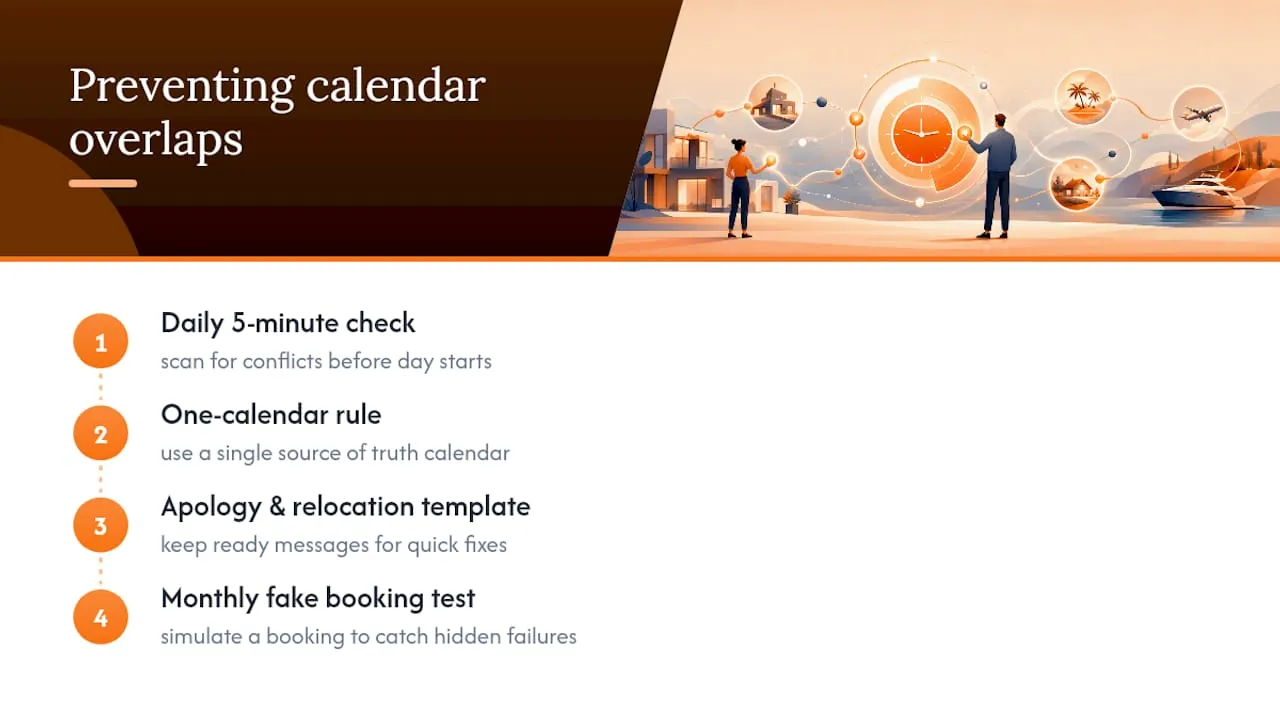
The daily 5-minute calendar check, paired with a strict one-calendar rule, stops most incidents before they start. Keep a ready apology and relocation template on hand, and test your own platform with a fake booking once a month. That habit alone catches the silent failures dashboards miss.
See How RealtevoOS Maps to Every Step Above
Everything covered here, the master calendar, the two-way sync, the audit logs, the monitoring, has to work together or it doesn’t work at all. That’s the gap RealtevoOS is built to close: instead of stitching together a PMS, a channel manager, and a spreadsheet of manual blocks, RealtevoOS gives you one command center where two-way API sync, ARI propagation, and centralized audit logs run as a single system rather than separate tools you have to babysit.
Property managers using an integrated approach report saving hours of manual checking every week, with faster conflict resolution and a clean audit trail ready if an OTA ever disputes a cancellation. The RealtevoOS management deck walks through exactly how sync, alerts, and reporting connect across your properties, and the onboarding team can tell you what time-to-value looks like for your specific portfolio size. If you’re ready to see it against your own calendars, request a demo and bring your worst double-booking story. It’s the fastest way to see whether the system actually holds up.
Sources
- How to Implement a System That Eliminates Double Bookings Forever • Localbird
- Avoiding double bookings: the only host cheat sheet you need · RentTools